Platforms Supported
This page lists supported platforms for dbWatch Control Center and its optional modules. Versioning details follow the release list at Release Notes.
Core Product Platform Support
On-Premise Databases
| Database | Versions Supported | Notes |
|---|---|---|
| Oracle | 8i, 9i, 10g, 11g, 12c, 18c, 19c, 21c, 23c | Includes Express, Standard, Enterprise editions |
| Microsoft SQL Server | 2000–2025 | All editions supported, except SQL Server 2005 (see note 1) |
| PostgreSQL | 8.2–18 | All major releases |
| MySQL | 5.1, 5.5, 5.6, 5.7, 8.0, 8.3, 9.7 | |
| MariaDB | 5.1–5.5, 10.×, 11.×, 12.x | |
| Sybase ASE | 12, 15, 16 | |
| MongoDB | 4.×, 6.×, 7.×, 8.x | Beta support only |
Cloud Platforms
| Provider | Engine | Versions Supported | Notes |
|---|---|---|---|
| Microsoft Azure | SQL Database (Single) | – | Limited by platform restrictions |
| SQL Managed Instance | – | Full support | |
| Azure MySQL & MariaDB | – | Full support | |
| Amazon RDS | SQL Server | 2014–2022 | |
| Oracle | 19c | ||
| MySQL | 5.7, 8.0 | ||
| MariaDB | 10.3–10.6 | ||
| PostgreSQL | 10–14 | ||
| Amazon EC2 | Any | Same as On-Premise | Matches local db platform support |
Module-Specific Platform Support
SQL Performance Package
| Database | Versions |
|---|---|
| Microsoft SQL Server | 2014–2025 |
| Oracle | 11g–23c |
| PostgreSQL | 9.4–18 |
| MySQL | 5.7, 8.0, 9.7 |
| MariaDB | 10.2–10.11, 11.×, 12.x |
| Sybase ASE | 15, 16 |
Automated Maintenance Package
| Database | Versions |
|---|---|
| Microsoft SQL Server | 2014–2025 |
Security and Compliance Package
| Database | Versions |
|---|---|
| Microsoft SQL Server | 2014–2025 |
Agresso ERP Package
| Database | Versions |
|---|---|
| Microsoft SQL Server | 2014–2022 |
| Oracle | 11g–21c |
Notes
- Microsoft SQL Server – TLS compatibility for older versions*
Some older Microsoft SQL Server versions (typically SQL Server 2014 and earlier, and unpatched SQL Server 2016 installations) only support TLSv1 by default.
Recent Java versions used by dbWatch Control Center disable TLSv1 unless explicitly enabled, which may prevent successful connections to these database versions.
If monitoring such SQL Server versions, TLSv1 support can be enabled in dbWatch Control Center by updating the Java security configuration:
1. Stop the dbWatch Control Center service
2. Edit the file (default Windows location): C:\Program Files\dbWatchControlCenter\dbwatch_server.parameters
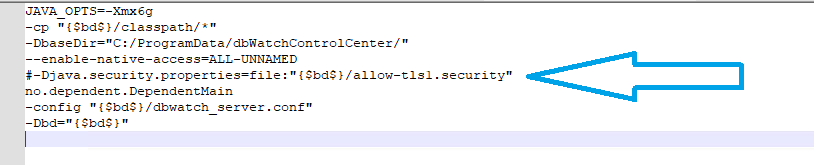
3. Remove the leading `#` from the following line:
#-Djava.security.properties=file:”{$bd$}/allow-tls1.security”
4. Save the file
5. Start the dbWatch Control Center service
Important:
Microsoft SQL Server 2005 is not supported by dbWatch Control Center.
Connection attempts to SQL Server 2005 have not been successful in practice, even when enabling TLSv1 as described above.
For installation and licensing of additional modules, see Installing and Using Premium Packages.
Need help verifying your environment? Contact support@dbwatch.com for compatibility inquiries.