Upgrade dbWatch Control Center
This document describes how to upgrade dbWatch Control Center with the current supported methods. Please note that automatic upgrades from within dbWatch Control Center are no longer available. Centralized upgrades can instead be handled using Microsoft Group Policy (GPO) or other enterprise software distribution tools.
Upgrading Manually
A manual upgrade is performed by running a newer dbWatch Control Center installer on a server where dbWatch is already installed.
- The installer will detect the existing installation automatically.
- All existing configurations, domains, instances, and jobs are preserved.
- Only program binaries are replaced during the upgrade.
- If there are changes to configuration file formats, these will be applied automatically the next time dbWatch Control Center is started.
This method is suitable for:
- Single-server installations
- Test and lab environments
- Environments where change control requires local execution of installers
Run the installer according to the Windows installation guide.
Centralized Upgrades Using Microsoft Group Policy (Recommended)
Since automatic upgrades from within dbWatch Control Center have been removed, Microsoft Group Policy (GPO) can be used to deploy upgrades in a controlled and repeatable way across multiple Windows servers.
Note:
Group Policy–based upgrades are only applicable to Windows servers. Linux installations must still be upgraded manually.
Overview
Using GPO, you can:
- Deploy a new dbWatch Control Center version to multiple servers simultaneously
- Ensure consistent versions across all dbWatch nodes
- Control rollout timing (e.g. maintenance windows)
- Integrate dbWatch upgrades into existing enterprise patching routines
You can use Group Policy to distribute computer programs by using the following methods
General Approach
A typical GPO-based upgrade process looks like this:
- Download the latest dbWatch Control Center installer (MSI or EXE).
- Place the installer on a centrally accessible network share (read-only for target servers).
- Create or update a Group Policy Object that runs the installer at computer startup, or Deploys the installer as a computer-assigned package.
- Link the GPO to the Organizational Unit (OU) containing the dbWatch servers.
- Reboot the servers or wait for the next policy refresh cycle.
During startup, the installer will:
- Detect the existing dbWatch installation
- Perform an in-place upgrade
- Preserve all configuration data
Important Considerations
- Ensure the installer runs with local administrator privileges.
- Plan upgrades during maintenance windows, as dbWatch Control Center services will restart.
- Verify that all dbWatch nodes are upgraded to the same version to avoid version mismatch issues.
- Test the GPO upgrade process in a staging environment before rolling it out to production.
Linux Servers
Automatic or GPO-based upgrades are not supported on Linux.
Run the installer according to the Linux installation guide.
Refer to the Linux installation documentation for detailed, step-by-step instructions.
Client Components (dbWatch Monitor)
The same installer is used for both dbWatch Control Center (server) and dbWatch Monitor (client) installations.
When installing or upgrading dbWatch Monitor on client machines:
- Run the standard dbWatch installer used for server installations.
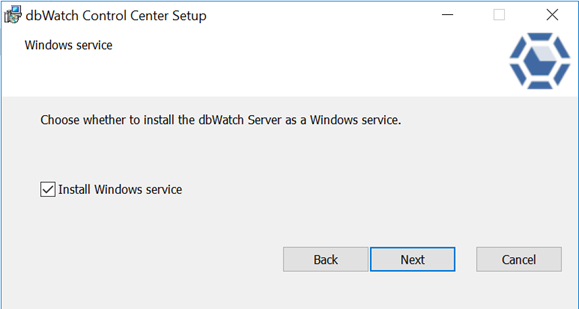
- During the installation wizard, clear the option: “Choose whether to install dbWatch Server as a Windows service”
- With this option unchecked, only the dbWatch Monitor component is installed.
This allows a single installer package to be used consistently across servers and client machines.
Upgrade Notes for Client Installations
dbWatch Monitor installations are not upgraded automatically when upgrading the Control Center.
Client machines must be upgraded separately, using:
- Manual installer execution, or
- Enterprise software distribution tools such as Group Policy (GPO), SCCM, or Intune.
The upgrade is performed in-place and preserves existing client configuration.
Tip
The installer dialog clearly indicates the server-service option, making it easy to verify that only the Monitor component will be installed. See installer screenshot:
Summary
- In-application automatic upgrades are no longer available.
- Manual upgrades remain fully supported.
- Microsoft Group Policy is the recommended approach for centralized Windows server upgrades.
- Linux servers and client components require manual or separate upgrade procedures.
This approach ensures predictable, secure, and enterprise-friendly upgrade management for dbWatch Control Center.