Managing Jobs
The Manage Jobs window in dbWatch Control Center provides a centralized interface for managing monitoring and maintenance jobs on database instances.
You can use this interface to install, reinstall, upgrade or uninstall jobs on individual instances or multiple instances.
Jobs can be managed individually or through job templates. Job templates allow you to maintain a common set of monitoring jobs and configurations across multiple database instances.
How to get here
To open Manage Jobs, select Server → Server Configuration → Manage Jobs from the dbWatch Client menu.
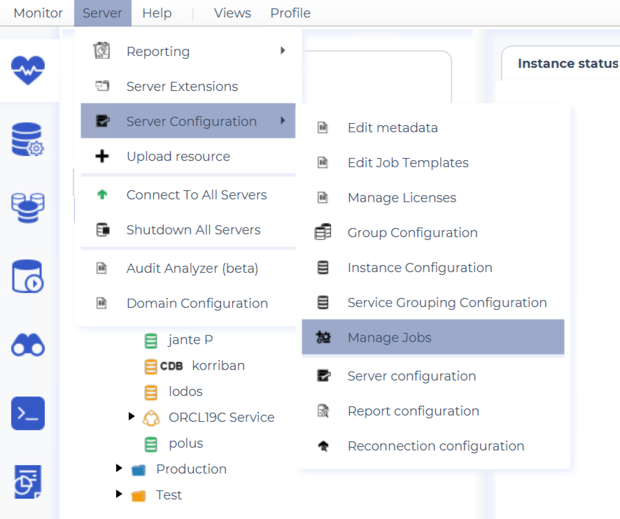
This opens the Manage Jobs window.
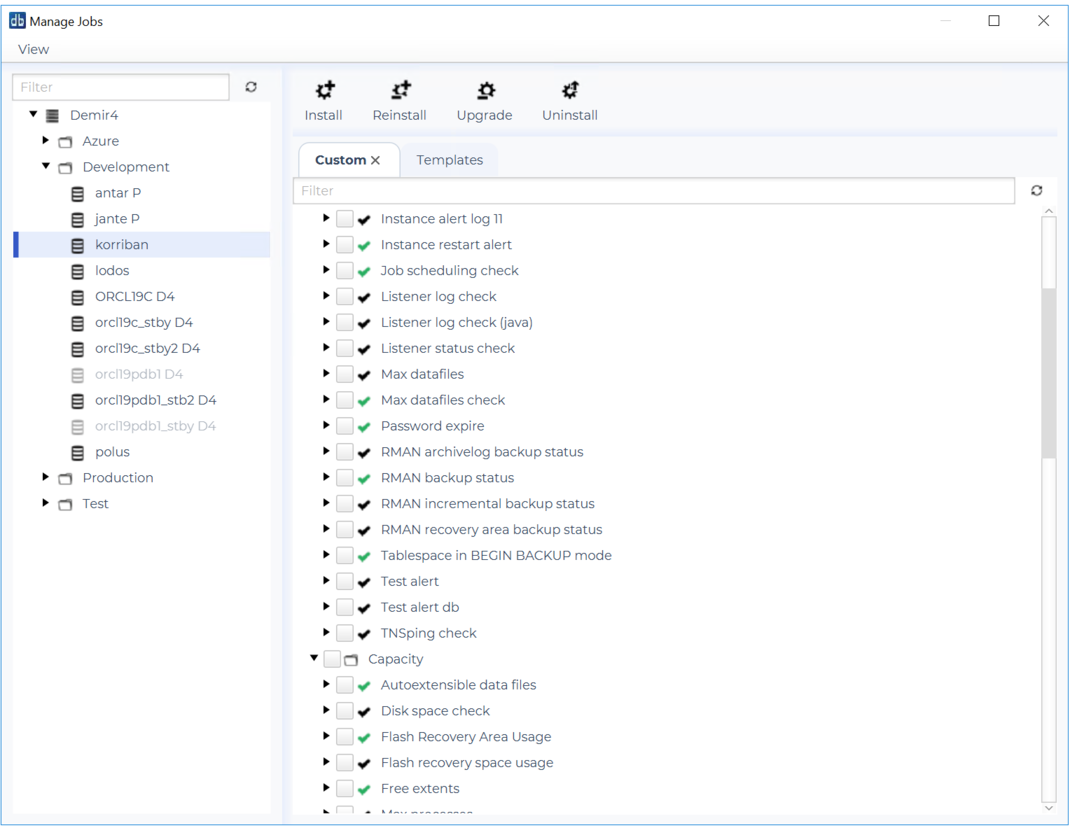
Selecting Database Instances
On the left side of the Manage Jobs window, you will find a tree containing the available database instances, organized by domain and group.
Select a database instance to display its available jobs.
The Filter field above the instance tree can be used to locate a specific instance or group.
Job Overview
The right side of the window displays the available monitoring and maintenance jobs for the selected instance.
Jobs are organized into categories, such as Capacity, making it easier to locate jobs related to a particular monitoring area.
There are two tabs:
| Custom | Displays jobs available for individual job management. |
| Templates | Provides access to job templates for managing predefined collections of jobs. |
You can expand individual jobs to inspect additional information and use the filter field to locate specific jobs.
The checkboxes allow you to select one or more jobs for the requested operation.
Managing Individual Jobs
The toolbar at the top of the Manage Jobs window contains four operations:
| Install | Installs the selected jobs on the selected database instances. |
| Reinstall | Reinstalls jobs that are already installed. |
| Upgrade | Upgrades installed jobs to newer available versions. |
| Uninstall | Removes the selected jobs from the selected database instances. |
Installing Jobs
To install additional monitoring or maintenance jobs:
- Select the database instance in the tree on the left.
- Open the Custom tab.
- Locate the jobs you want to install. Use the filter field if necessary.
- Select the jobs using their checkboxes.
- Click Install.
The installation process will install the selected jobs on the selected database instances.
The jobs available for installation may depend on the database type, license and monitoring configuration, including whether a local monitoring schema is installed.
Reinstalling Jobs
The Reinstall operation can be used to reinstall jobs that are already installed on a database instance.
- Select the relevant database instance.
- Select the installed jobs you want to reinstall.
- Click Reinstall.
Upgrading Jobs
The Upgrade operation is used to update installed jobs when newer versions are available.
- Select the relevant database instance.
- Select the jobs you want to upgrade.
- Click Upgrade.
Upgrading jobs is particularly useful after updating dbWatch Control Center, when newer job definitions may have been included in the software release.
Uninstalling Jobs
The Uninstall operation removes jobs from the selected database instances.
- Select the relevant database instance.
- Select the jobs you want to remove.
- Click Uninstall.
Managing Jobs Using Templates
Job templates provide a way to define and maintain a common set of monitoring jobs across multiple database instances.
When adding a new database instance through the Instance Wizard, you can choose to install jobs based on a template or select individual jobs.
Templates can also be assigned or modified after the instance has been added to dbWatch Control Center.
The Templates tab in Manage Jobs provides access to template-based job management.
Assigning Templates Using Metadata
Job template assignments can be managed through Server → Server Configuration → Edit metadata.
The metadata properties jobtemplate and jobtemplatemode control which templates are assigned to an instance and how template synchronization handles jobs.
Depending on the template configuration, manually installed jobs or individual job configurations may be affected by subsequent template synchronization.
The Edit metadata interface is particularly useful when you need to apply job changes to several database instances without configuring each instance separately.
For more information about configuring templates and template synchronization, see Job templates.
Manage Jobs Versus Instance Wizards
There are two main ways to install monitoring jobs on a database instance.
| Instance Wizard | Used when adding a new database instance. Allows you to choose a job template or select individual jobs during initial installation. |
| Manage Jobs | Used to manage jobs on database instances that have already been added to dbWatch Control Center. Supports installation, reinstallation, upgrades and uninstallation of jobs. |