Managing security groups
Security groups
This is where you define the groups that users and roles can have privileges on.
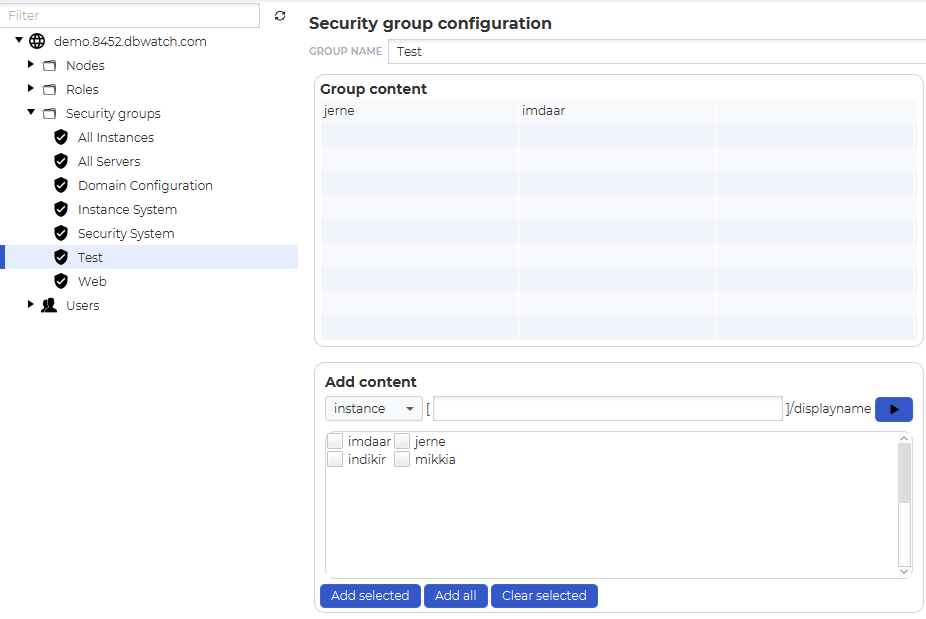
There are some predefined security groups:
| Security group name | Description |
| All Instances | A group containing all instances in this dbWatch Domain |
| All Server | A group containing all dbWatch servers in this dbWatch Domain |
| Domain Configuration | A group that restricts access to the domain configuration |
| Instance System | A group that restricts access to adding and removing instances |
| Security System | A group that controls privileges related to the security system (adding/removing users, changing privileges and so on. |
| Web | A group that restricts access to the Web Server |
User-defined security groups can currently contain targets/instances and servers. In the example, the security group “Massoss” contains the instances “ORATEST001 through ORATEST009“.
You can filter the content in the “Add content” box by typing an fdl filter in the textfield. In the example only Oracle instances are shown.
For specific privileges look at the Privilege and actions map