Transfer Specification
The Transfer Specification function is used to transfer connection- and monitor-related properties from one instance to another. This is especially relevant in Oracle Data Guard environments, where the primary database role may shift between different instances during a switchover or failover.
dbWatch Control Center does not automatically know which instance becomes the new primary after a role change. Using the Transfer Specification function ensures that:
- The new primary receives the monitor user (read/write monitoring).
- The former primary reverts to a property-only configuration.
- The PDB instances follow the same transition, with correct Connect / Disconnect settings.
- Service groupings remain consistent and reflect Oracle Data Guard topology.
This chapter explains how to use Transfer Specification in a Data Guard environment, using an example with three nodes.
Example Environment
The following Oracle Data Guard configuration is used as a reference scenario:
- ORCL19C – Primary CDB
- ORCL19C_stby – Standby CDB
- ORCL19C_stby2 – Additional standby CDB
Only the primary CDB has a monitor user configured in dbWatch Control Center.
Standby instances contain only a property user (typically SYS) because they are not in read/write mode.
After performing a switchover:
- The former primary instance will show in blue (monitor user cannot connect).
- The new primary instance must receive the monitor user.
- Corresponding PDBs must be moved from Disconnect → Connect and vice versa.
dbWatch CC uses service grouping to organize this:
Level 1: ORCL19C Service
Level 2: DG19C D4, DG19C-stby D4, DG19C-stby2 D4
Each group contains:
- One CDB
- One PDB (standby PDBs normally in Disconnect mode)
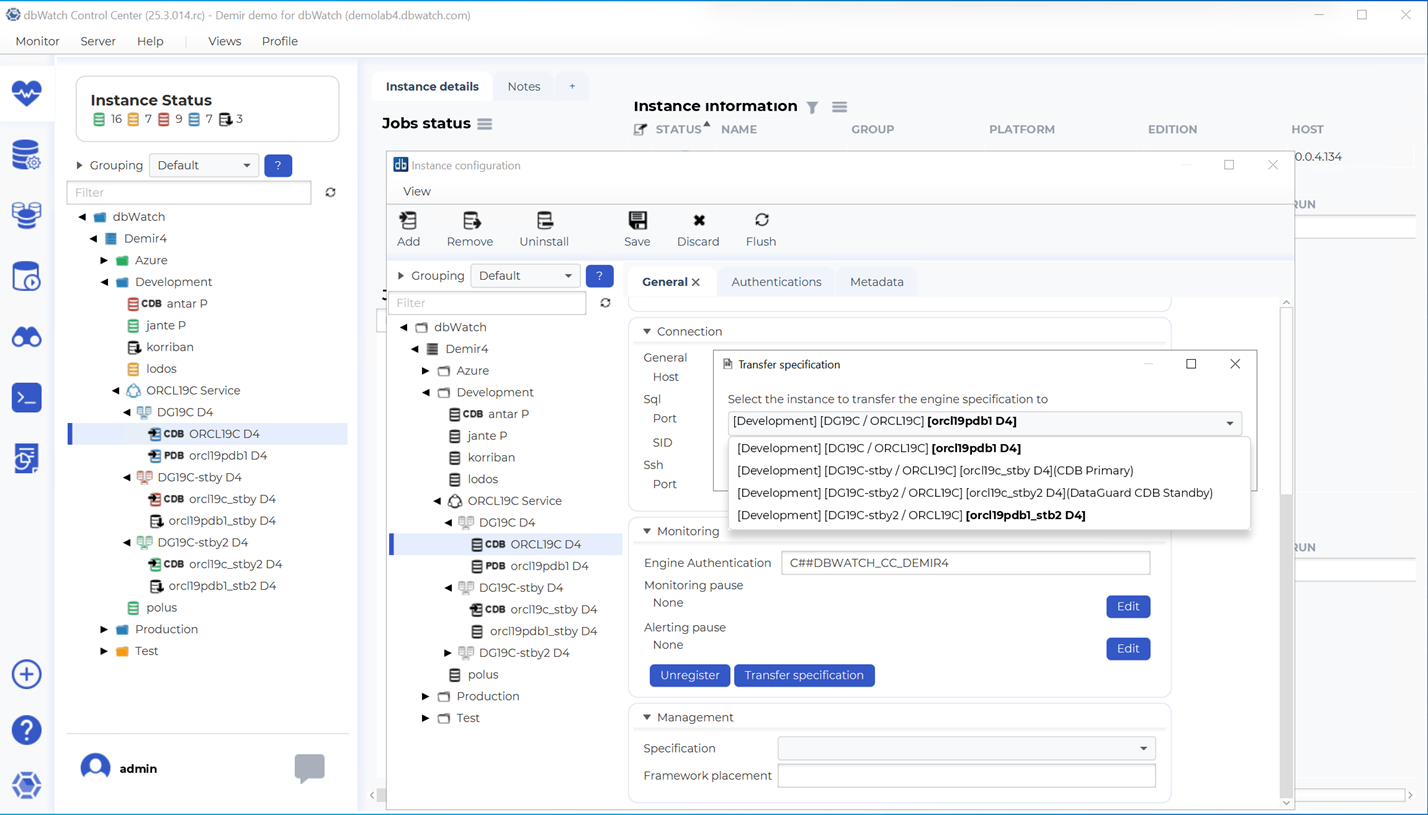
How to Access Transfer Specification
You access this function via:
Server → Server Configuration → Instance Configuration → Transfer Specification
The Transfer Specification dialog allows selecting a source instance (the previously primary instance) whose configuration should be transferred to the selected instance (the new primary).
Performing a Switchover
The following procedure describes how to update dbWatch CC after completing a switchover between ORCL19C and ORCL19C_stby.
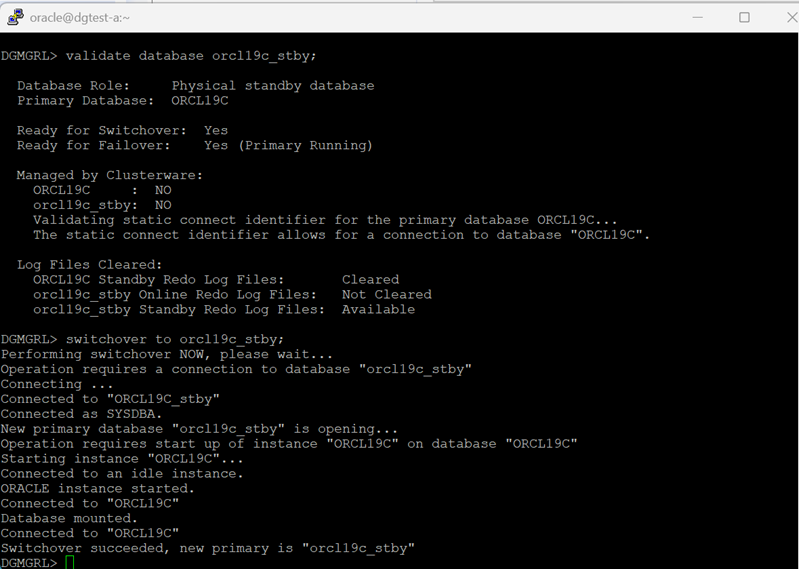
Step 1 – Execute the Oracle Switchover
Perform the switchover using Oracle Data Guard Broker or SQL commands.
After the switchover:
- ORCL19C_stby becomes the new primary
- ORCL19C becomes a standby
- dbWatch CC will show ORCL19C in blue, indicating monitoring failure (this is expected, as the monitor user no longer matches)
Step 2 – Transfer Specification for CDB Instance
To update the monitor user configuration:
- Select the old primary CDB (ORCL19C).
- Open Transfer Specification.
- Choose ORCL19C_stby (new primary) as the target.
- Perform the transfer.
Result:
- ORCL19C_stby now holds the monitor user.
- ORCL19C retains only SYS-level configuration.
- Monitoring continues on the correct primary node.
Step 3 – Update PDB Connection Modes
Before transferring the PDB configuration, ensure:
- The new primary PDB (inside ORCL19C_stby) is set to Connect.
This step is required because standby PDBs are not accessible.
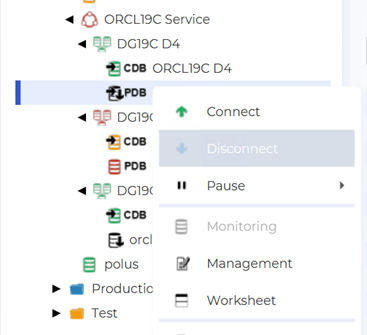
To change connection mode:
Right click on Instance → Connect / Disconnect
Step 4 – Transfer Specification for PDB Instance
- Select the old primary PDB.
- Open Transfer Specification.
- Choose the new primary PDB as target.
- Execute the transfer.
After this:
- The new primary PDB contains correct monitor properties.
- The old primary PDB should be changed to Disconnect mode.
This procedure ensures that both CDB and PDB parts of the monitored service reflect the Data Guard role changes accurately.
Step 5 – Verify Service Grouping Status
After the transfer is complete:
- The CDB and PDB under the new primary service group should show Connected.
- The former primary should show its CDB connected (property user only) and PDB in Disconnect mode.
- Standby groups should remain unchanged.
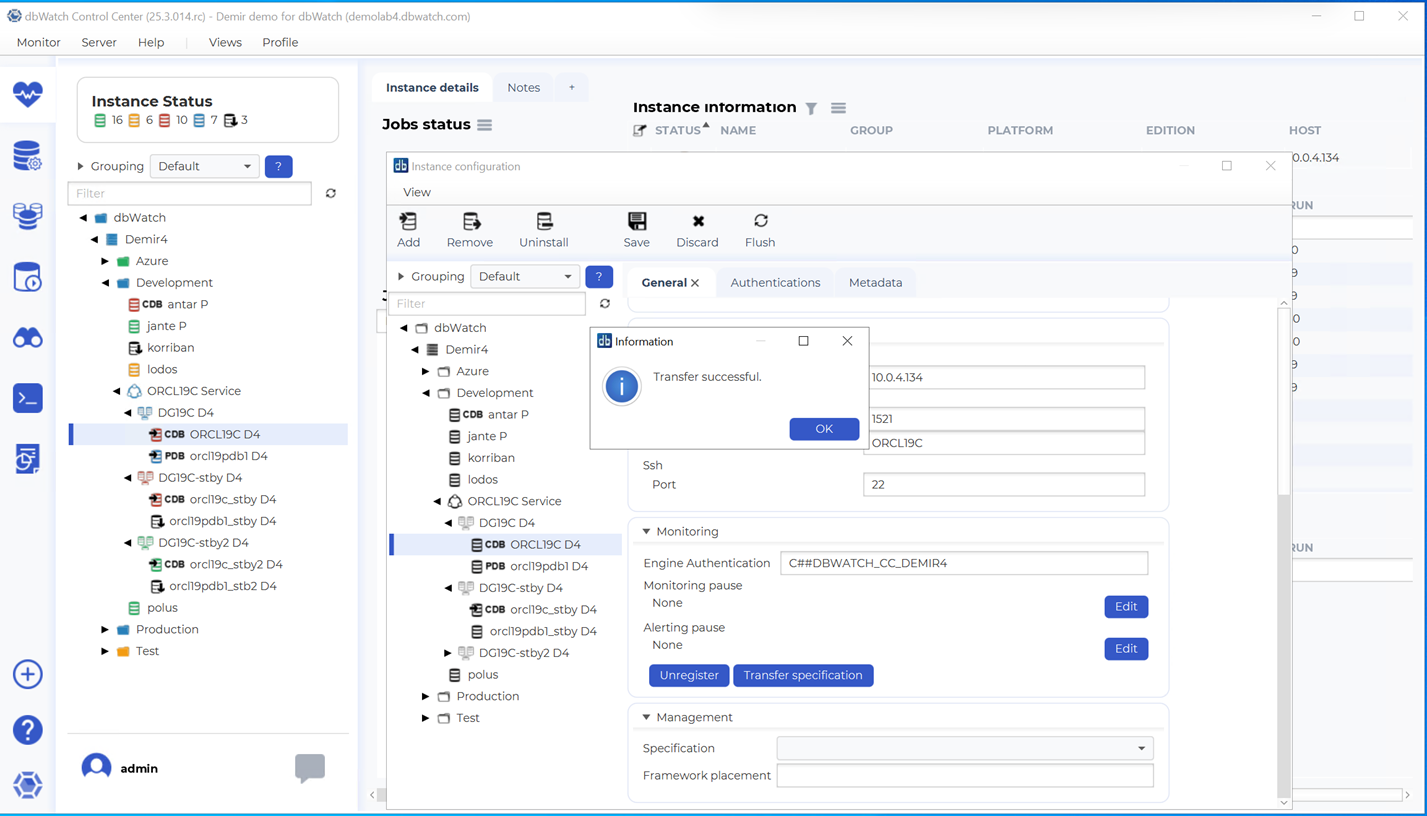
Correct service grouping ensures dbWatch CC visually presents the Data Guard structure.
Summary of the Workflow
| Component | Action After Switchover |
|---|---|
| orcl19c_stby D4 (new primary) | Run Transfer Specification, becomes monitoring target |
| ORCL19C D4 (old primary) | Becomes standby, monitor user removed automatically |
| orcl19pdb1_stby D4 (new primary) | Set to Connect, run Transfer Specification |
| orcl19pdb1 D4 (old primary) | Set to Disconnect |
| Other standbys | No changes required |
Benefits of Using Transfer Specification
Ensures monitor user always follows the active primary node
- Minimizes reconfiguration after Data Guard switchovers
- Keeps hierarchical service grouping consistent
- Reduces downtime in database monitoring
- Maintains correct read/write expectations per role
Notes and Recommendations
- A single monitor user should only exist on the current primary.
- Standby nodes should never have monitor users; property connections are sufficient.
- After failover scenarios, the same procedure applies.
When managing many Data Guard clusters, service grouping dramatically simplifies visibility and configuration.