Server Settings
Server Configuration
The Server Configuration can be accessed through the Server / Server Configuration / Server configuration menu.
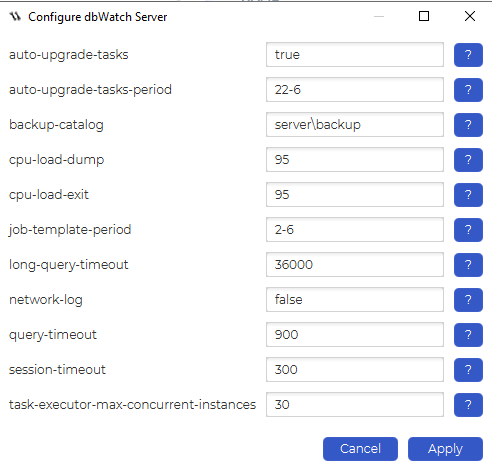
The configuration values control the following:
| Field | Description |
|---|---|
| auto-upgrade-tasks | Specifies if the dbWatch Server should automatically upgrade jobs |
| auto-upgrade-tasks-period | Specifies period when the dbWatch Server should automatically upgrade tasks. Format is [from hour]-[to hour], f.ex ‘22-6′ will be from 22 in the evening to 6 in the morning. |
| backup-catalog | Is the catalog where backup files are stored. |
| cpu-load-dump | The dbWatch Server will create a thread dump if the CPU load exceeds this limit (in percent). (For debug purposes). 0 = no dump |
| cpu-load-exit | The dbWatch Server will restart if the CPU load exceeds this limit (in percent) over time. 0 = no restart |
| job-template-period | Specifies period when the dbWatch Server should automatically sync job templates. Format is [from hour]-[to hour], f.ex ‘22-6′ will be from 22 in the evening to 6 in the morning. |
| long-query-timeout | How long (in seconds) a task/alert that is part of the Maintenance package is allowed to run. |
| network-log | If network logging should be enabled (true/false) |
| query-timeout | Regulates two things. How long (in seconds) a task/alert is allowed to run, and how long a query (SQL Worksheet) is allowed to run. |
| session-timeout | How long (in seconds) a session (SQL Worksheet) can be inactive before it is closed. |
| task-executor-max-concurrent-instances | The maximum number of instances that the Server will attempt to trigger jobs for simultaneously. |
Report Configuration
The Report Configuration can be accessed through the
Server / Server Configuration / Report configuration menu.
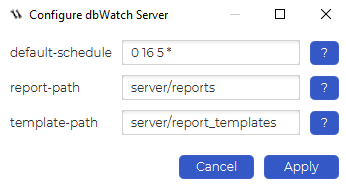
The configuration values control the following:
| Field | Description |
|---|---|
| default-schedule | The default schedule used when scheduling reports. |
| report-path | The path where generated reports are stored. |
| template-path | The path where the report templates are stored. (Not currently in use) |
Reconnection Configuration
The Reconnection Configuration can be accessed through the
Server / Server Configuration / Reconnection configuration menu.
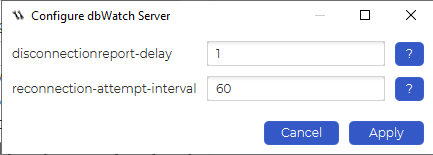
The configuration values control the following:
| Field | Description |
|---|---|
| disconnectionreport-delay | Number of connection attempts before report signal is sent. |
| reconnection-attempt-interval | Interval between each connection attempt in seconds. |